Search This Blog

Wednesday, July 29, 2026

Sunday, February 22, 2026

Updated 2026] How to Update Hathway SD Set Top Box Software: Manual Methods & Secret Codes


Is your Hathway SD Set Top Box showing a "Downloading Error" or missing your favorite channels? Often, a simple software update is all you need to fix glitches, improve picture quality, and unlock new features.
While Hathway usually updates its boxes automatically via OAD (Over-Air Download), sometimes the process gets stuck. In this guide, we will show you the step-by-step manual methods to update any Hathway box in minutes.
Why Should You Update Your Hathway STB?
Before we dive into the steps, here is why keeping your software current is vital:
 * Fixes "No Signal" or "Downloading Error" bugs.
 * Updates the Channel List automatically.
 * Improves UI Speed and remote responsiveness.
 * Resolves Audio-Video Lag issues.
Method 1: The "Forced Boot" Manual Update (Recommended)
This is the most effective way to force the box to pull the latest firmware from the cable signal.
 * Power Off: Turn off the main power switch of your Set Top Box.
 * The Magic Button: Locate the Reset or Power button on the physical box (front or top panel).
 * Hold and Start: Press and hold that button while you turn the power back on.
 * Wait for the Screen: Keep holding until you see a blue or grey screen that says "Software Downloading" or "Loader Version."
 * Completion: Let the progress bar reach 100%.
> Important: Do not turn off the power during this process. If interrupted, your box might get permanently damaged (Bricked).
Method 2: Update Using the Remote (Settings Menu)
If your box is working but you want to check for a newer version, use this menu-based approach:
 * Press the Menu button on your Hathway remote.
 * Navigate to System Setup or Installation.
 * Select Software Update or OTA Update.
 * If prompted for a PIN, try the defaults: 0000 or 1234.
 * Select Start to begin the search for the latest firmware.
Method 3: Fixing the "Downloading Error" at 0%
If your update is stuck at 0%, it usually means the signal strength is low.
 * Check the RF Cable: Ensure the round white cable behind the box is tight.
 * Signal Test: Go to Menu > System Setup > Signal Test. Your signal quality should be above 70%.
 * Master Reset: If the signal is fine but the update fails, choose Factory Reset in the settings menu. This wipes old bugs and re-triggers the update.
Secret Shortcut Keys for Hathway Boxes
Depending on your model (Skyworth, Cisco, or Humax), these remote combinations can trigger hidden menus:
| Model Type | Remote Shortcut | Action |
|---|---|---|
| Common SD Box | Press Exit 4-5 times during Bootup | Forced Download |
| Newer Models | Press Menu repeatedly during Bootup | Opens Loader Menu |
| HD Models | Press Green button then 1-0-8-0 | Resolution Reset |
Still Facing Issues? Try a Digital Refresh
If the software is updated but channels are still not appearing, you don't need a technician.
 * Download the Hathway Selfcare App.
 * Login with your VC Number (found on the card inside the box).
 * Click on "Refresh STB." This sends a high-voltage signal to your box to reset your subscription and software status remotely.
Conclusion
Updating your Hathway SD Box doesn't have to be complicated. By following the "Forced Boot" method, you can solve 90% of your cable TV problems without calling customer care.
Did this guide help you? Let us know in the comments which model you are using!
Tags: #Hathway #SetTopBox #SoftwareUpdate #TechTips #CableTV #HathwaySD
Next step for you:
Would you like me to generate a high-quality thumbnail image for this blog post to help it stand out
Our topic related to - Hathway SD Box software update, Hathway Set Top Box manual update, Hathway STB Downloading Error fix, Hathway remote shortcut keys
You can Search : Learn the latest manual methods to update your Hathway SD/HD Set Top Box software. Fix "Downloading Error" and refresh channels with secret remote codes.


Thursday, November 6, 2025

LG 32LF515A-TF Backlight


LG 32LF515A-TF Backlight


Long - 59cm
Voltage - 6v 
6 LED PER STRIP 
3 STRIP USED


LG 32LF515A-TF Backlight

Saturday, October 4, 2025

TDA11105 PS/N3/3 Substitutes CRT TV Repair

TDA11105 PS/N3/3 Substitutes – Complete CRT TV Repair Guide

🧰 Introduction

The TDA11105 PS/N3/3 IC is widely used in LG, Philips, and universal CRT TV kits. Technicians often struggle to find the original IC. This guide provides compatible numbers, substitute ICs, equivalent series, and practical repair tips to simplify your repair workflow.

Using the correct substitutes ensures optimal TV functionality and longevity.

TDA11105 PSN33 Substitutes CRT TV Repair


⚙️ Importance of IC Substitution

  • Availability: Original ICs may be unavailable; substitutes often provide the only solution.
  • Cost Efficiency: Substitute ICs are cheaper, reducing repair costs.
  • Compatibility: Correct substitutes maintain TV performance.
  • Service Simplification: Universal CRT kits often support substitute ICs for better compatibility.

🧩 TDA11105 IC Substitutes – Master Table

Original IC Compatible / Substitute ICs Equivalent Series Notes
TDA11105 PS/N3/3 TDA11105PS/N1/2, TDA11105PS/N2/3 Same Family EEPROM reset may be required
TDA11105PS/N2/3 TDA11105PS/N3/3, TDA11105PS/N1/2 Philips Equivalent Adjust service mode after replacement
TDA11105PS/N1/2 TDA11105PS/N3/3, TDA11104PS/N2/3 Cross-Compatible Check voltage compatibility
TDA11104PS/N2/3 TDA11105PS/N3/3 Jungle IC Series Adjust color via EEPROM
TDA11106PS/N2/3 TDA11105PS/N3/3 Higher Series Check vertical oscillator

🔧 Vertical IC Substitutes

Original Vertical IC Substitute ICs Notes
LA78040 LA78041, LA78045 Use proper heat sink
LA78041 LA78040, LA78045 Verify supply voltage
TDA8177 TDA8172, TDA8170 Adjust vertical height in service mode
TDA8356 TDA8350Q, TDA8357J Check PCB layout compatibility

Tip: Fine-tune picture size and linearity in service mode after replacing vertical ICs.

🛠️ Practical Repair Tips

  1. Service Mode: Adjust geometry, color balance, and sound settings.
  2. EEPROM Programming: Reset or reprogram EEPROM (24C08, 24C16) when required.
  3. Voltage Testing: Verify voltage levels with a multimeter.
  4. Heat Management: Apply proper heat sinks and thermal paste if ICs run hot.
  5. Signal Compatibility: Ensure support for PAL/NTSC/SECAM.
  6. Pinout Verification: Always check substitute IC pinout.

📌 Best Practices

  • Check datasheets before using substitutes.
  • Maintain a list of tested and verified substitutes.
  • Substitute ICs may require minor adjustments in service mode.
  • Incorrect EEPROM programming can damage the TV.
  • Cross-reference substitute ICs with original family for best results.

🏁 Conclusion

This enhanced guide provides complete information on TDA11105 PS/N3/3 substitutes, equivalent series, practical tips, and best practices. Follow all steps including service mode adjustments, EEPROM verification, voltage testing, and heat management to ensure successful repairs.

Call to Action: Share this guide with technicians and post your experiences or questions in the comment section.

Compatible IC Numbers for LG CRT TV Kit – CRT TV Main IC Substitutes

 Title: CRT TV Main IC Substitutes – Compatible IC Numbers for LG CRT TV Kit (Detailed Guide)

Introduction:
CRT (Cathode Ray Tube) TVs may seem like old technology today, but they still hold value for many users and technicians, especially in rural areas or small repair shops. Among CRT TV brands, LG CRT TVs are widely known for their durability and reliable picture quality. However, when repairing these TVs, one of the most common challenges is finding compatible or substitute ICs (Integrated Circuits) for the main board.

In this post, we will cover LG CRT TV main IC substitutes, discuss their functions, pin compatibility, and provide a detailed guide for identifying equivalent ICs that work in CRT TV kits. This will be a valuable resource for electronics repair engineers, technicians, and hobbyists.

Compatible IC Numbers for LG CRT TV Kit – CRT TV Main IC Substitutes


Understanding the Main IC in LG CRT TVs

The Main IC (also known as the jungle IC or system IC) in a CRT TV is responsible for multiple operations such as:

  • Video and audio signal processing

  • Synchronization and deflection control

  • Color decoding (PAL/NTSC/SECAM)

  • On-Screen Display (OSD) control

Because of these functions, choosing a correct replacement IC is crucial for maintaining picture quality and avoiding horizontal or vertical sync issues.


Common LG CRT TV Main IC Models

Here are some commonly used main ICs in LG CRT TVs:

Original IC Number Function / Description Compatible Substitute ICs
TDA9381PS/N2/3/1908 Jungle IC (Video/Audio Processor) TDA9384PS/N3/4/1908, TDA9381PS/N2/3/1910
TDA9384PS/N3/4/1908 Main Processor for 21" LG TVs TDA9381PS/N2/3/1908, TDA9381PS/N2/3/1910
TDA9370PS/N2/AI1225 Used in older LG 21” TVs TDA9370PS/N2/AI1230, TDA9371PS/N2/AI1240
TDA9381PS/N2/3/1910 Multi-system Jungle IC TDA9384PS/N3/4/1908, TDA9381PS/N2/3/1908
TDA9373PS/N2/AI1241 Main IC for LG Flatron CRT TV TDA9370PS/N2/AI1225, TDA9371PS/N2/AI1240
TDA9384PS/N3/4/1908 Common IC in LG Universal Kit TDA9381PS/N2/3/1908, TDA9381PS/N2/3/1910
LA76810A Video/Chroma/Sync IC LA76818A, LA76814A, LA76812A
LA76931 Jungle IC for newer LG CRT models LA76933, LA76935, LA76938

Important Tips for Selecting Substitute ICs

  1. Check Pin Configuration:
    Even though many ICs are compatible, the pin configuration might differ slightly. Always compare datasheets before replacement.

  2. Use Same IC Series:
    For best performance, stick to ICs from the same family or series, like replacing TDA9381 with TDA9384.

  3. Check System Compatibility:
    Ensure that the substitute supports the same TV system standard (PAL, NTSC, or SECAM).

  4. Firmware and EEPROM Data:
    Sometimes, even with a compatible IC, you might need to reprogram or replace the EEPROM (24C08, 24C16, etc.) to match the software.

  5. Check Power Supply Voltage:
    Verify that the VCC and ground pins match and that the IC supports the same voltage range.


CRT TV Kit and Universal Board IC Information

Many LG CRT TV repair kits come with universal main boards, which are designed to work with several ICs. Common ICs in these kits include:

  • TDA9381PS/N2/3/1908 (Most popular in 21-inch kits)

  • TDA9384PS/N3/4/1908 (Used in slim CRT models)

  • TDA9370PS/N2/AI1225 (Older models)

  • LA76931 / LA76933 (Newer flat CRT TVs)

When using a universal CRT kit, always ensure that the IC used matches the original tuner type, deflection yoke, and power supply.


Common Problems When Using Substitute ICs

Problem Possible Cause Solution
No display EEPROM not matched Reprogram or replace EEPROM
Color distortion Mismatch in color decoder IC Check system format (PAL/NTSC)
Vertical collapse IC pin mismatch or wrong IC Verify pin configuration
No sound Audio output pin mismatch Check audio amp IC and connection

Helpful Resources for Technicians

  • Datasheets: Always download datasheets from trusted semiconductor sources (like NXP, Philips, or Toshiba).

  • Service Manuals: Use LG CRT TV service manuals to confirm circuit layouts.

  • Universal Board Manuals: Most CRT TV kits come with IC compatibility charts.


Conclusion

Finding the right substitute IC for an LG CRT TV can make the difference between a successful repair and wasted effort. Always verify compatibility by comparing the datasheets, pinouts, and voltage ratings. Universal CRT kits with ICs like TDA9381PS, TDA9384PS, or LA76931 are the most common choices for replacement.

This guide will help you confidently replace ICs in LG CRT TV kits, ensuring stable performance and long-lasting results.


Keywords: LG CRT TV IC, CRT TV Kit IC Substitute, TDA9381PS compatible IC, TDA9384PS replacement, LA76931 substitute, CRT TV jungle IC, Universal CRT board IC list, LG CRT TV repair guide, CRT main IC chart.

Friday, August 22, 2025

LG CRT TV EHT WINDING DATA BSC23-N0107 SUBSTITUTE

 6002K                          LG CTV EHT

6002X
6040C
6006Y
6006E
BSC25-N6014A
BSC23-N0107
BSC23-N02107
BSC25-3373
EBJ52759501
1-HOUT, 2-+180V, 3-+B, 4-GND, 5-14V, 6-+14V, 7-GND, 8-ABL, 9-HTR, 10-AFC

LG CRT TV EHT WINDING DATA BSC23-N0107 SUBSTITUTE


LG CRT TV EHT WINDING DATA BSC25N=1649 SUBSTITUTE

 BSC25N-1682             LG CTV EHT

BSC25N=1649
BSC25N-1595
BSC25N-0304
FOK21-LG03
6174V-6006M
6174V-6006N
1-HOUT, 2-+B, 3-+14V, 4--14V, 5-180V, 6-GND, 7-GND, 8-+28V, 9-ABL, 10-HTR

LG CRT TV EHT WINDING DATA BSC25N=1649 SUBSTITUTE


LG CRT TV EHT WINDING DATA 6174V-6006H SUBSTITUTE

 EBJ54065901           LG CTV EHT

BSC25 NO 304
BSC24- 3366J
6174V-6006H
BSC25- N6329
154-064P
6174V-5003L
BSC28-W2334
1-HOUT, 2-+B, 3-+14V, 4--14V, 5-+200V, 6-GND, 7-NC, 8-+28V, 9-ABL,10-HTR

LG CRT TV EHT WINDING DATA 6174V-6006H SUBSTITUTE


LG CRT TV EHT WINDING DATA SUBSTITUTE 8005A

 8005A                    LG CTV

8005E
8003C
8005F
8004C
6002J
6040A
22406
154-177B            WINDING - 123/457910
1-HOUT, 2-+B, 3-+180V, 4-GND, 5-16V, 6-NC, 7-45V, 8-ABL, 9-HTR, 10-AFC
G CRT TV EHT WINDING DATA SUBSTITUTE 8005A


LG CRT TV EHT WINDING DATA 6174Z-8005C SUBSTITUTE

 6174Z-8005C           LG CTV EHT SUBSTITUTE

8005B
8005V
6002G
6002J
8001
8008A
6040B
1-HOUT, 2-+180V, 3-+B/110V, 4-GND, 5-NC, 6-24V, 7-GND,8-ABL, 9-HTR, 10-AFC
G CRT TV EHT WINDING DATA 6174Z-8005C SUBSTITUTE


Monday, May 5, 2025

capacitor color code calculator

Capacitor Color Code Calculator


Tuesday, April 22, 2025

Resistor Color Code Calculator

Resistor Color Code Calculator


Resistor Color Code Calculator

CRT Flyback Transformer Testing – Simple Methods & Common Faults

CRT Flyback Transformer Testing – Simple Methods & Common Faults

CRT फ्लायबैक ट्रांसफार्मर की जांच – आसान तरीके और सामान्य खराबियाँ

नमस्कार दोस्तों! आज के इस पोस्ट में हम सीखेंगे कि CRT टीवी के Flyback Transformer (FBT) की जांच कैसे करें और इसके खराब होने के लक्षण क्या होते हैं।

CRT Flyback Transformer Testing – Simple Methods & Common Faults


⚡ फ्लायबैक ट्रांसफार्मर क्या है?

CRT टीवी में फ्लायबैक ट्रांसफार्मर एक बहुत महत्वपूर्ण हिस्सा होता है जो हाई वोल्टेज जेनरेट करता है, जिससे पिक्चर ट्यूब काम करती है। इसे LOPT (Line Output Transformer) भी कहा जाता है।

🔍 फ्लायबैक ट्रांसफार्मर खराब होने के लक्षण:

  • टीवी ऑन होते ही तुरंत बंद हो जाना (shutdown problem)
  • TV में कोई display ना आना, लेकिन sound आना
  • FBT से जलने की smell या फटने की आवाज
  • HOT (Horizontal Output Transistor) बार-बार खराब होना

🔧 Multimeter से Flyback Transformer टेस्ट कैसे करें?

Step 1: टीवी को पावर ऑफ करके बोर्ड निकालें।
Step 2: Flyback के पिनों को multimeter से continuity मोड में चेक करें।

📌 Primary Coil Test:

  • Base pin से दूसरे दो पिनों के बीच 0.3 - 1.5 Ohm रेंज में resistance होना चाहिए।
  • अगर resistance 0 है या अनंत (infinite) है, तो coil कट या short हो सकता है।

📌 Diode & Output टेस्ट:

  • Multimeter को Diode Mode में रखकर output pin से ground तक चेक करें।
  • अगर reading दोनों तरफ से आ रही है तो अंदर का diode खराब है।

🧪 Flyback Tester से जांच:

अगर आपके पास flyback tester है तो उससे output coil पर ringing wave देख सकते हैं। अगर waveform नहीं आ रही है तो flyback dead हो सकता है।

🛠️ रिपेयर या रिप्लेस?

यदि FBT में diode short है, तो उसे रिपेयर करना मुश्किल होता है। ऐसे में बेहतर है कि उसी नंबर का नया flyback लगाएं। FBT का नंबर आमतौर पर इसके बॉडी पर लिखा होता है (जैसे BSC25-N0705)।

📺 सुझाव:

  • FBT चेक करते समय HOT ट्रांजिस्टर को भी जरूर जांचें
  • असली समस्या को isolate करने के लिए step-by-step चेक करें
  • सभी चेकिंग बिना पावर सप्लाई के करें, सुरक्षा के लिए

🎥 वीडियो से सीखना चाहते हैं?

जल्द ही इस टॉपिक पर एक डिटेल यूट्यूब वीडियो भी आएगा, कृपया हमारे चैनल को सब्सक्राइब करें।


Tags: CRT FBT testing, Flyback Transformer faults, CRT repair guide, CRT TV no display, how to test flyback transformer, electronics repair tips

CRT TV Main IC 8873CSCNG6PR6 Substitutes – Compatible IC Numbers for China Kit

CRT TV Main IC 8873CSCNG6PR6 Substitutes – Compatible IC Numbers for China Kit

CRT टीवी की मेन IC 8873 के विकल्प – चाइना किट के लिए सही IC नंबर

Hello Friends! Welcome to ELECTRONICS TRICS AND TIPS. In this post, we’ll talk about a very common issue in CRT TVs – the failure of the Main IC (Integrated Circuit) on the motherboard, especially in Chinese universal kits.
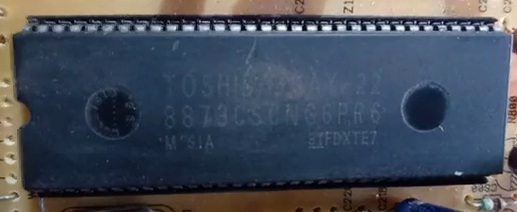
CRT TV Main IC 8873CSCNG6PR6 Substitutes – Compatible IC Numbers for China Kit

CRT TV Main IC 8873CSCNG6PR6 Substitutes – Compatible IC Numbers for China Kit


📌 Common IC Number in China CRT Kits:

One of the most commonly found main ICs in these kits is: 8873CSCNG 6PR6 (sometimes ending with V09).

🔁 Substitutes for IC 8873:

If the 8873 IC gets damaged or is unavailable, you can use the following substitute ICs:

  • 8873CSNG 6V09
  • 8873CSCNG 7D65
  • 8895CSNG7G09
  • 8873CSCNG 6PR6
  • 8895 series ICs commonly used in similar CRT boards

These ICs may have different model numbers, but they serve the same purpose in most Chinese CRT kits. They are interchangeable in many cases depending on the board layout.

🔍 Note:

Always verify the pin configuration and power supply specifications before replacement. While the functionality may match, the layout and voltage compatibility must be confirmed.

❌ ICs That Are NOT Compatible:

Some ICs like TD11105 are not compatible with these China kits. These are typically used in branded TVs like Konka, etc.

📥 More Information & Resources:

You can find detailed IC datasheets, diagrams, and compatible component info on our website. The link is available in the video description and below:


🧰 Final Tips:

  • Keep a list of common substitute ICs handy for quick repairs.
  • Label each removed IC properly to avoid confusion.
  • Check voltage rating before installing replacement.

Tags: 8873 IC replace, CRT TV IC number, China kit IC substitute, 8895 IC compatibility, CRT motherboard repair, TV technician guide

Monday, April 21, 2025

Top 5 Substitutes for the 555 Timer IC – Best Alternatives for Your Projects

Top 5 Substitutes for the 555 Timer IC – Best Alternatives for Your Projects

555 टाइमर IC के 5 बेहतरीन विकल्प – आपके प्रोजेक्ट्स के लिए सर्वोत्तम विकल्प

The 555 Timer IC is one of the most popular and versatile integrated circuits used in electronics projects. However, there are situations where you might need an alternative due to availability, specific requirements, or design considerations. Here are the top 5 substitutes for the 555 Timer IC:

Top 5 Substitutes for the 555 Timer IC – Best Alternatives for Your Projects


1. NE556 Dual Timer IC

The NE556 consists of two independent 555 timers in a single package. It's ideal for applications requiring dual timing circuits.

2. LM556 Dual Timer IC

Similar to the NE556, the LM556 offers two timers in one package with improved performance characteristics.

3. TLC555 CMOS Timer

The TLC555 is a CMOS version of the 555 timer, offering lower power consumption and a wider operating voltage range.

4. ICM7555 Low-Power Timer

The ICM7555 is a low-power CMOS timer that serves as a direct replacement for the standard 555 timer in battery-operated devices.

5. LMC555 CMOS Timer

The LMC555 offers high-speed operation with low power consumption, making it suitable for modern electronic applications.

📌 Applications:

  • Pulse generation
  • Time delay circuits
  • Oscillators
  • LED flashers
  • Audio tone generation

🔗 Additional Resources:

For more information on these ICs and their datasheets, visit the manufacturers' websites or trusted electronics component distributors.

📢 Final Words:

Choosing the right timer IC depends on your project's specific requirements. The substitutes listed above offer various features that might better suit your application than the standard 555 timer.


Tags: 555 timer alternatives, NE556, LM556, TLC555, ICM7555, LMC555, electronics components, IC substitutes

How to Make a Simple Touch Sensor Switch at Home

<

How to Make a Simple Touch Sensor Switch at Home

घर पर आसान टच सेंसर स्विच कैसे बनाएं

In this post, we will learn how to make a simple and effective Touch Sensor Switch using basic electronic components. This project is perfect for beginners who want to try hands-on electronics projects at home.

🔧 Required Components:

  • 1 x BC547 Transistor
  • 1 x LED
  • 1 x 1K Resistor
  • 1 x 10K Resistor
  • 1 x 9V Battery
  • 2 x Metal Wires for touch input
  • Breadboard and jumper wires

📘 Circuit Diagram:

You can connect the components as shown below:

  • Connect the collector of the BC547 to the negative terminal of the LED.
  • The emitter goes to the ground (battery -).
  • One metal wire connects to base via a 10K resistor, and another wire to the battery positive (+).
  • Touching both wires will turn the LED ON.

💡 How it Works:

When you touch the metal wires, your body conducts a small current that triggers the base of the transistor. This allows current to flow from collector to emitter, lighting up the LED.

How to Make a Simple Touch Sensor Switch at Home


📌 Applications:

  • Automatic light switch
  • DIY electronic toys
  • Science fair projects

🎥 Video Tutorial:

Watch the full video tutorial here:

📎 Download PDF Circuit Diagram:

Click here to download

📢 Final Words:

This is a very basic and interesting project. With just a few components, you can understand how touch-based switching works in modern electronics. Try it out and share your results!


Tags: Touch sensor project, Electronics trick, DIY circuit, LED sensor switch, BC547 project

Best Product On Amazon Must Buy

Best Electronics Soldering Iron Kit - https://amzn.to/3gIulii

Best Desoldering Pump Soldering Iron - https://amzn.to/3egN4Qp

Best Screw Driver Set For Repairing - https://amzn.to/2OsA0ND

Best Cord less Screw Driver Set - https://amzn.to/3eqvtWw

Best & Cheap Digital Multimeter - https://amzn.to/467dOOb

Best Fold Scope Microscope Basic Kit - https://amzn.to/393WI6o

Best & Smallest 60x Microscope - https://amzn.to/477r5HQ

Microware-20x-to-1000x-8 Led-usb -   https://amzn.to/2W8DGs0

Best Magnifying-Soldering-Stand - https://amzn.to/2ZVcZrM

Supper LED TV Backlight tester - https://amzn.to/3gLyXEo

Mini Hand Drill and 20pcs Drill Bits - https://amzn.to/3fiEWAc

Popular Posts